Other Costs
Besides the price of the parts themselves, orders and production usually come with other costs: shipping, fees, labor, tooling, taxes, discounts, etc. These can be added to:
- Purchase orders
- Sales orders
- Products (BOM revisions) and their production builds
Other costs are listed on their own Other Costs section, along with the order's (or BOM's) subtotal and total. From there you can Add Cost, Add From Template (see below), edit or remove them.
Types of Costs
A cost can be one of these types:
- Fixed: a price × a quantity (e.g. 2 hours of labor at 50 USD/h, or a single shipping fee)
- Fixed per row: a fixed amount for each row (item) of the order (e.g. a handling fee per line)
- Percentage of total: a percentage of the order's subtotal (e.g. a 3% payment fee)
Costs can be negative, which is how you'd enter a discount.
Taxation
Each cost can also be set as:
- Taxable: taxes are calculated on it too
- Non-taxable: taxes are not calculated on it
- Tax (percentages only): the cost is itself a tax, calculated on the items and on the taxable costs (discounts included). Other percentages are calculated on the items only.
Templates
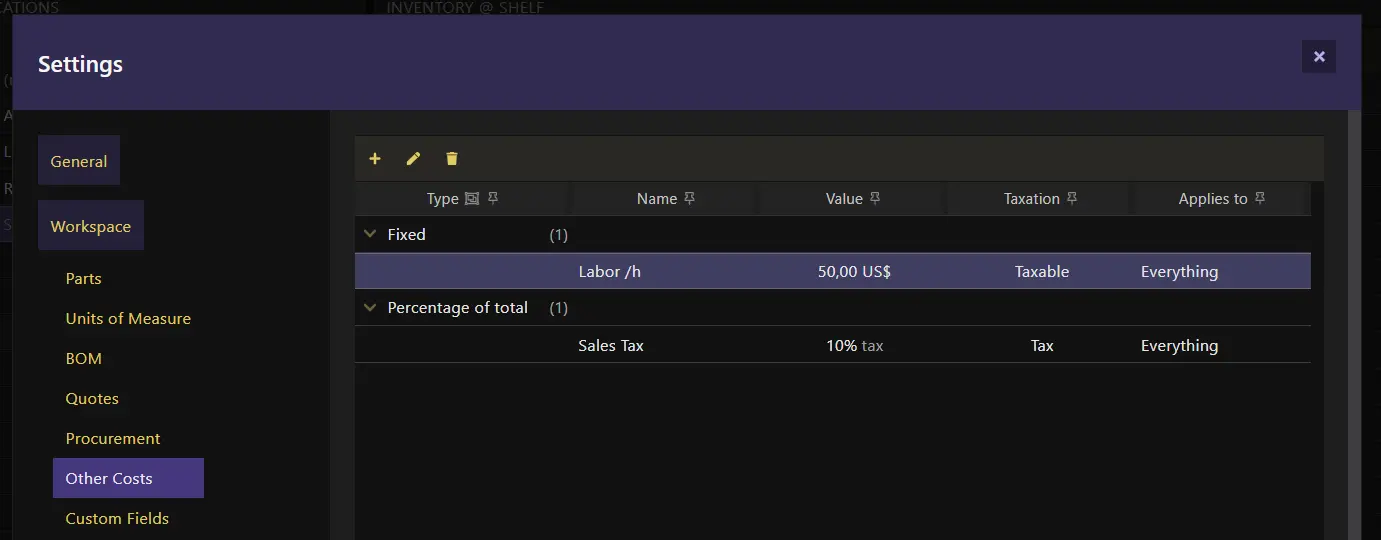
Costs you use often can be defined once, as templates, through Settings > Workspace > Other Costs, and then picked whenever needed (Add From Template). Each template can be limited to purchase orders, sales orders and/or production, so only the relevant ones are offered on each.
How Other Costs Affect Unit Costs
On sales orders, other costs are only part of the order's total.
On purchase orders, other costs are split between the items and added to the unit cost of their parts once received. In other words, the unit cost of a part you buy also accounts for its share of shipping, fees, etc.
On products, other costs defined on a BOM revision are copied to the production builds created from it. They can still be changed on each build during production and, when the build is finished, they become part of the unit cost of the product that was built.