Date pickers now have a select box to quickly select the year and month
Settings: Enforce quotes no longer exists. On a purchase list, selecting quotes is mandatory so purchase orders for each supplier can be created.
Multiple labels can be removed at the same time
Inventory on a Lot can now be manually increased. This might result in traceability loss as this adjustment might not be related with the purchase order or project build the Lot was originally created at, so adding a comment explaining this adjustment is recommended.
[fix] Suppliers: not able to create a price break on a custom quote
[fix] API: part not being correctly assigned when creating a project build
[fix] External links not opening on the default browser
[fix] Print shortcut printing inventory barcode labels on the Parts view, instead of part barcode labels
Team Workspaces can now be recycled. Recycling a team workspace consists of deleting it and creating a new one from scratch, keeping the same team members. All data is lost. Only owners can recycle a team workspace.
[fix] Parts: when manually creating parts disable auto-completer if type is not ´outsourced`
You can now set the Preferred Part Number a part should be identified with: Internal PN or Part Number. This is done through Settings > Workspace > Preferred PN. With this, fields like Alternates, that display a list of alternative parts, will use either part number to identify those parts. On barcode labels, when the preferred PN is set to Internal PN, the Internal PN is used on the barcode label's title (instead of the manufacturer's Part Number) as it's more relevant.
Custom fields of type App Element can now have multiple values. As an example, on a custom field of type App Element - Part you could set multiple parts under that field.
New shortcut: Ctrl + P (or Cmd+P on macOS). This sends selected items on the most recently used table to the printer, similar to manually exporting labels and selecting Send to printer as the output method. The most recently used table is the one that received a click or on each an item was most recently selected.
Contacts: references to Customer removed. Instead of a Customer #, a contact has now an ID which consists of an alternative way to identify the contact other than by its name
Contacts: references to VAT# field renamed to Tax ID
When auto-assigning parts, consider generic parts as well
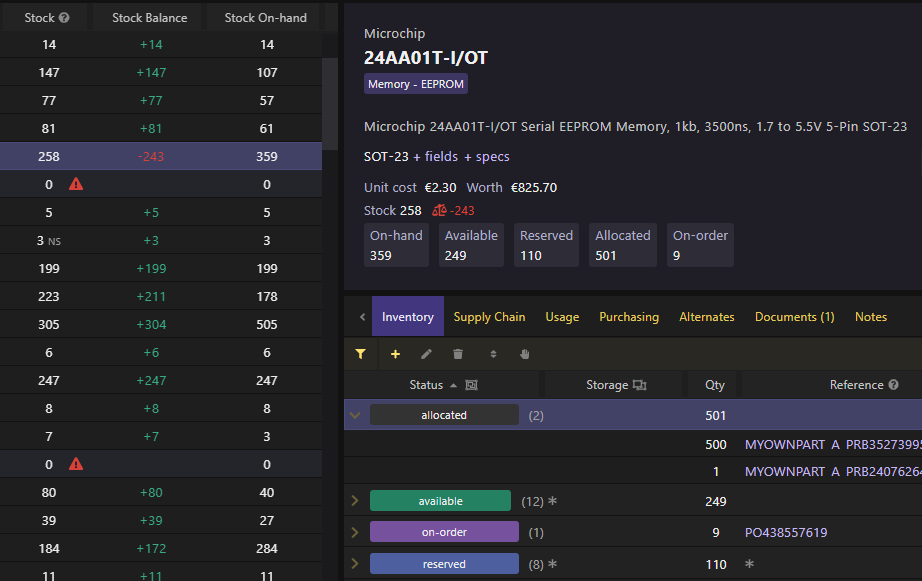
Stock On-hand renamed to Stock Available
Stock On-hand now represents the sum of stock available plus the stock reserved, as both stock available and reserved are technically on-hand.
New types of inventory: allocated and in-production. These allow to list and track inventory that has been allocated to purchase builds or sales orders. Allocated inventory doesn't necessarily exist or is associated to any specific stock unit, but it allows to represent a need for that inventory. Later, this will be used to better plan production and purchasing by taking into account current inventory levels and already allocated inventory, as well as its timeline. Lastly, in-production inventory allows to track units that are currently in production, similarly to the on-order inventory that was already being listed.
Stock Balance: this represents all the stock that is available and incoming (ordered or in-production) minus the stock that has been allocated. This should provide you with a useful insight on whether you are stocking more inventory than you need (overstocking) or the opposite (understocking).
Part details and inventory table display all stock types (on-hand, available, reserved, allocated, on-order and in-production)
Parts: Autocomplete... menu allows to autocomplete data (description, value and package) on existing parts
Tables: column selector is searchable
Team management: team members can be added / invited / removed through the Account & Team dialog, Team Workspace's name can be edited through the Workspace Selection dialog
Company logo: logo is synced on Team Workspaces. You will have to set your company logo again in case you have done it before, through the Account dialog